
Can’t make it to the new museum opening, and worried you’ll never see the main attraction in person? Don’t worry - 3D printing plus Raspberry Pi can bring it to you. Museum in a Box is a smart use of 3D printing concepts and Raspberry Pi programming that shares knowledge with people anywhere in the world.
Museum in a Box: Bringing Collections to You
Museum in a Box began in 2015 and has created over eight million miniature 3D prints. The concept is unusual but effective. 3D printed miniatures of museum exhibits, combined with an audio box powered by Raspberry Pi. The box detects when a 3D object rests on top and begins playing the associated audio file. An interactive museum experience that’s also portable allows wide sharing of limited exhibits. Rather than original displays sitting on a shelf, these boxes bring history into the digital age. Expert knowledge combined with a physical object you can feel brings the museum experience into the real world.
Touching More Than Screens
Museum in a Box caters to a younger audience with its inclusion of technology in the accurate presentation of each miniature. Its origins are not a surprise since its founder is George Oates, an original designer at Flickr. Younger generations are visual and live their lives inundated with tech, and this project serves to meet them in a familiar place.
Digitizing curated items isn’t a huge leap since photographs and 3D representations aren’t new. But using 3D print technology to shrink artifacts from the Smithsonian or UK National History Museum? Then the question became how to illustrate each item without a docent packed into each box. Raspberry Pi answered that challenge.
Real World Applications
Raspberry Pi is a tiny computer well-suited to the task of explaining tiny museum artifacts. The Raspberry Pi Foundation explains its desire to bring digital making to people across the world. Its humanitarian goals echo Museum in a Box’s educational and cultural premise. The computers are inexpensive and learning to program them requires little training.
A blog post from a mom attended one of Museum in a Box’s workshops captured the essence of the project. Her young son enjoyed the experience so much that he requested to attend a second workshop. This unusual tech trick is doing its best to bring history alive, one box at a time.

Whoever said 'small is beautiful' knew what they were talking about. The Raspbery Pi could provide the perfect solution as a cost-effective way of hosting your own website. It is more than capable of running the necessary software to create a basic site or blog. You could also use it as a test machine for running a WordPress development system.
Many of us dream of creating and running our own blog, but are put off by the hassle of finding the right hosting solution. Let’s take a look at the practicalities of a DIY workaround with your Raspberry Pi. You might be surprised at just how straightforward it can be.
Why Pi?
Many people are surprised to hear something so small, inexpensive and simple can be used as a web server. But there are several factors that make it a perfect choice. Your desktop machine might not have sufficient system resources to perform the role reliably, and there is the fact that if you are seeking an always-on web server, the low energy footprint of the Raspberry Pi can really come into its own.
Getting started
Before you begin, make sure the hardware is all in order. Check you have been through the basic setup procedure, and that you have all the essential hardware. Naturally, you also need to have a suitable operating system installed. For the following purposes, we will assume you have the latest version of Raspbian installed.
The next step is to setup SSH if you have not already done so. Then it is just a case of configuring your Raspberry Pi by installing an appropriate web server application such as Apache and you are ready to start uploading HTML pages.
You will find that life is much easier if you also set up FTP on your device. This greatly simplifies the process of replacing the basic placeholder with your own PHP or HTML content.
Your own personal website
Let’s get one thing straight, you are never going to be hosting games and video content using your Raspberry Pi, but for a simple website or blog, the potential is considerable. Armed with only a battery pack and an internet dongle, you have the power to host a website from anywhere in the world. And best of all, you have complete control and no reliance on anyone else.

1. Shell out $300+ on ebay for something that retailed for $60.
2. Build your own with a Raspberry Pi for 1/3 of the price!
Can you guess which one I'm going to recommend?
There are numerous reasons why building your own NES Classic is infinitely better:
- It's cheaper
- It's hackable out of the box without any bricking concerns
- Allows you to play games on virtually any retro system
The purchase list
Raspberry PI 3 Model B A1.2GHz 64-bit quad-core ARMv8 CPU, 1GB RAM
SanDisk Ultra 16GB Ultra Micro SDHC UHS-I/Class 10 Card with Adapter (SDSQUNC-016G-GN6MA)

8Bitdo Bluetooth Wireless Classic NES Controller

Raspberry Pi power supply (mini USB cable)
HDMI Cable (Let's be honest, you have a bunch of these laying around)
Naturally you can substitute the controller for any USB or Bluetooth one that you have lying around. But the 8Bitdo is arguably the best one on the market.
I have everything, what's next?
All that's required next is to install the Retropie software onto the SD card for the Pi. This is pretty simplistic, because once the software is on the SD card, you will simply be able to plug it into the SD slot on the Pi. Once plugged into the Pi, you will be greeted with an extremely user friendly UI. You'll configure the gamepad of your choice, setup wifi, and adjust things like the screen size.
You'll also need to get your hands on ROMs, which are the game files used on emulators. I won't go into much detail about how to obtain these, because unless you already own a physical copy of the game, chances are it's most likely illegal to download the game online. It's a bit of a grey area legally, but if by chance you do own copies of the games, I'd recommend Emuparadise, which is one of the best ROM sites online.
Once you've downloaded the ROMs, you'll be able to transfer them to the SDcard or onto a USB stick, which you can plug into the USB port of the Raspberry Pi. From this point, you'll be off to the races, reliving the glory days of the 90s.
If you wanted to take it to the next level, you could even go so far as to 3D print a custom NES case. There's a bunch of examples and links to cases here
Questions, comments, concerns? Let me know!

For those of you interested in building your own wireless water cannon powered by Raspberry Pi, you might be interested in the new Water Gun Kit created by Joe Hoskisson based in Salt Lake City.
The kit comes almost ready for your use and provides educational introduction to electronics and robotic programming for children aged 12 and above. The water gun is battery powered and wireless which allows it be placed it in strategic positions. You can pivot it left an right with the touch of a button and make it squirt by pressing space bar.
Features of the Wireless Raspberry Pi Water Gun Kit:
• no soldering required
• quality instruction manual
• complete Python code to get the water gun to squirt and pivot
Along the way in the building process you will learn about:
• How to setup the Raspberry Pi
• How to connect to the Raspberry Pi with your desktop or laptop over WiFi
• Basic circuitry using components such as resistors, transistors, and diodes
• General Purpose Input Output pins on the Raspberry Pi (these pins allow you to control external devices)
• Solderless prototyping boards or breadboards
• Basic programming concepts in the Python language
• Basic commands in the Linux terminal (command line)
To learn more about the Raspberry Pi Water Gun Kit watch the demonstration video above or visit their KickStarter page and make a pledge if you are interested.
Source: Kickstarter
The world of technology has improved a lot and therefore, this has resulted to development of systems that help in the teaching of computer science to ensure that students keep up with the current technological changes. Among these system is the Raspberry Pi which provide learners with basic programming knowledge such as the controlling of a 12V linear actuators. Motion systems are designed to create motion to an appliance by creating a rotary motion. As a result, the appliance is able to move in a circular motion. On the other hand, linear actuators produce linear motion which enables the item to move in a straight line.

The basic information in the usage of a Raspberry Pi is learning the appropriate language such as python to use in controlling of the actuators. The raspberry Pi has more that seventeen GPIOs which can be connected to the actuators that one needs to use hence making it for the user to even control more than one actuator. Computer science learners have the obligation of determining the amount of python language that they need to know before starting the program in order to make work easier for them.

The GPIOs pins enables the programmer to control the amount of voltage that can be allocated to the actuator hence making it possible to carry out physical computing. As a result, this enables the programmer to communicate to the actuators. In return, the programmer can read the voltage of the actuator and this gives an insight of how the actuator communicates with the programmer. Therefore, this will aid in controlling the motion of the actuator. Each of the pins of the Raspberry Pi is a representation of a binary state and, therefore, the programmer can only input a 1 or a 0. One of the common actuators that learners can use is the 12V linear actuator.

In addition, through the use of the Raspberry Pi, an individual is able to convert rotary motion produced by motion systems into a linear motion using a processor. However, the Raspberry Pi cannot function on its own and would need some external power supply in order to complete the system. A good example of Raspberry Pi usage is the creation of surveillance motion cameras which makes it easy for the individual to monitor them using the local internet connection. Such surveillance cameras are easy to make since they only require the basic programming language of python.
There are plenty of actuators in the market and, therefore, their choice depends on speed, stroke, voltage and the force that they produce. In terms of voltage, most actuators require twelve or twenty-four volts in order to function well during automation. Given that different projects require unique types of actuators, then an individual has to consider more characteristics of the actuator such as the limit switches, IP ratings, and mounting options among others. The strokes show the length that the device can move while the speed indicates how fast it can move depending on the amount of voltage applied. As well the force indicates the specific weight that the actuator can withstand. Therefore, for an individual to ensure the success of a project that involves the use of a Raspberry Pi, it is important for them to familiarize with the python programming language and the different types and characteristics of actuators.
The basic information in the usage of a Raspberry Pi is learning the appropriate language such as python to use in controlling of the actuators. The raspberry Pi has more that seventeen GPIOs which can be connected to the actuators that one needs to use hence making it for the user to even control more than one actuator. Computer science learners have the obligation of determining the amount of python language that they need to know before starting the program in order to make work easier for them.

The GPIOs pins enables the programmer to control the amount of voltage that can be allocated to the actuator hence making it possible to carry out physical computing. As a result, this enables the programmer to communicate to the actuators. In return, the programmer can read the voltage of the actuator and this gives an insight of how the actuator communicates with the programmer. Therefore, this will aid in controlling the motion of the actuator. Each of the pins of the Raspberry Pi is a representation of a binary state and, therefore, the programmer can only input a 1 or a 0. One of the common actuators that learners can use is the 12V linear actuator.
In addition, through the use of the Raspberry Pi, an individual is able to convert rotary motion produced by motion systems into a linear motion using a processor. However, the Raspberry Pi cannot function on its own and would need some external power supply in order to complete the system. A good example of Raspberry Pi usage is the creation of surveillance motion cameras which makes it easy for the individual to monitor them using the local internet connection. Such surveillance cameras are easy to make since they only require the basic programming language of python.
There are plenty of actuators in the market and, therefore, their choice depends on speed, stroke, voltage and the force that they produce. In terms of voltage, most actuators require twelve or twenty-four volts in order to function well during automation. Given that different projects require unique types of actuators, then an individual has to consider more characteristics of the actuator such as the limit switches, IP ratings, and mounting options among others. The strokes show the length that the device can move while the speed indicates how fast it can move depending on the amount of voltage applied. As well the force indicates the specific weight that the actuator can withstand. Therefore, for an individual to ensure the success of a project that involves the use of a Raspberry Pi, it is important for them to familiarize with the python programming language and the different types and characteristics of actuators.

To begin with, the new Raspberry Pi Zero W costs twice as much - $ 10. But it's still an incredibly good offer in terms of price / features. Letter W in the designation reflects the main trends and, perhaps, the only difference from its predecessor - support for wireless connectivity. It uses the same Cypress CYW43438 wireless chip as Raspberry Pi 3 Model B to provide 802.11n wireless LAN and Bluetooth 4.0 connectivity.
For the rest, the board is the same as the Pi Zero: a single-core 1GHz CPU, 512MB of RAM, and plenty of I/O for hacking. Here’s a breakdown of the full specs on the Raspberry Pi Zero W:
• 1GHz, single-core CPU
• 512MB RAM
• Mini-HDMI port
• Micro-USB On-The-Go port
• Micro-USB power
• HAT-compatible 40-pin header
• Composite video and reset headers
• CSI camera connector
• 802.11n wireless LAN
• Bluetooth 4.0
The Zero W also has a new case with three interchangeable lids, one that's solid, one with a hole for GPIO pins, and another with a hole for the camera module. It will fit both the Raspberry Pi Zero and Raspberry Pi Zero W. You can find out more over at the Raspberry Pi Foundation.

It comes with a real time safety alert system, navigation and voice-to-text technology. It also lets you build your own driving apps and make Dride as intelligent as you are. Another amazing feature of Dride is a cloud based DVR for drivers to save their dash-cam footage and share the footage with world-wide driving community while storing GPS locations and license plate numbers. With the use of Dride Cloud, reckless drivers will be encouraged to drive more responsibly, since they know that their dangerous speed or reckless actions will be documented and reported.
 |
| ADAS alert system warns you if you are in danger and watches your back during your journey. |
Companion App

 |
| Available on the App Store and Google Play |
Hands-Free
Dride is also equipped with Alexa assistant allowing you to interact with it on the road You can also have Dride read and write your text messages and navigate you to your destination so that you can keep your eyes off your phone and on the road!

To learn more about Dride do visit their KickStarter page and make a pledge if you are interested.
Source: Kickstarter

Basically the Compute Module 3 offers the same connections as a Raspberry Pi. However, these are in the form of contacts on the board. The number of contacts and dimensions of the PCB correspond to those of a SO-DIMM memory latch (68 x 31 mm) - but the compatibility is purely mechanical, otherwise there is no similarity with a memory latch.
For development purposes, a breakout board is also provided, which carries out the contacts in the form of pins and corresponding terminals. It offers, among other things, an HDMI and USB port as well as a micro SD card slot.
The new module is basically compatible with the original Compute Module. However, in the data sheet indicated that the Compute Module 3 is one millimeter higher and more power than the original.
The Compute Module 3 will cost around $30 , the Lite version $25. The original Compute Module is also reduced to $25.
Source: raspberrypi.org

GRasPi harnesses the power of the Raspberry Pi to run open source app like Guitarix (or others) which, controlled from an external MIDI pedal, offers a very large variety of custom sounds to the musician. The long battery life allows a good autonomy even to street musicians, furthermore with appropriate software the MIDI input port can be used with a master keyboard and enable its use simultaneously with a guitar.
 |
| Flow chart |
The small size and low weight makes it the perfect companion of your guitar or it can serve as an alternative when you don't have the opportunity to use your large and heavy amplifier. To learn more about the new GRasPi do visit their KickStarter page and make a pledge if you are interested.
Source: KickStarter

The LTE chip will be integrated into various add-on expansion boards from various third-party partners, according to PC World. Altair claims that its LTE chips are supported by multiple network providers across the globe. The firm also added that drivers and software required for its LTE chips to work on a Raspberry Pi are also ready for roll out.
Altair's LTE Category-1 chipset features downlink speeds of up to 10Mbps and extremely low power consumption. The chipset is software upgradable for CAT-M1 LTE connectivity, targeting low power, low throughput IoT devices. The cost-optimized chipset is highly integrated and includes an advanced on-chip power management unit, integrated DDR memory and a low power CPU subsystem with a strong security framework for customer developed applications.
About Altair Semiconductor
Altair Semiconductor is a leading provider of single-mode LTE chipsets. Altair's portfolio covers the complete spectrum of cellular 4G market needs, from supercharged video-centric applications all the way to ultra-low power, low cost IoT and M2M. Altair has shipped millions of LTE chipsets to date, commercially deployed on the world's most advanced LTE networks including Verizon Wireless, AT&T, Softbank and KT (Korea Telecom).

Inspired by the likes of GuruPlug and DreamPlug, PowerPi presents a tidy solution to powering your Pi without the octopus of cables that usually comes with a single board computer.
Design
PowerPi's simple and elegant design allows you to switch out either SD cards or whole Pis with ease. Also in order to make it a world compatible Pi case, hot plug was incorporated and the power transformer able to regular power to the Pi regardless of the country of use.

1. Compatible with all generations of full size Pi
2. Access to HDMI/Sound/USB/SD/Ethernet.
3. Swappable plug heads for UK/US/EU/OZ
Main Use Cases
1. VPN Server
2. File Server
3. Media Centre
4. DNLA
To learn more about the new PowerPi do visit their Kickstarter page and make a pledge if you are interested. It has already reached 30% of its funding goal and £2,000 is required to take the new PowerPi into production.

It has recently taken to Kickstarter to raise the required funds to take their new retro games console into production. They are also planning on to produce more games for the indieGO! and Amiga Computers as well as provide a new lower cost version using the powerful and affordable Orange Pi mini PC. The team also wants to create an expansion for the indieGO! which allows to use and backup original 3.5" disks from Amiga, ATARI and other systems.
Device Overview:
indieGO! is an ARM powered system and the only one with a DVD-RW or optional BD-RW drive which allows you to play and or backup your CD-based retro games. It can also be used as an media center PC or as an power-efficient computer running Linux, Android or AEROS.
It even runs x86 Linux software using Eltechs Exagear Emulator which works similar to "Rosetta" Emulation which was used by Apple during the transition from PPC-CPU's to Intel CPU's. Long story short, you can run many compatible PC/Linux apps seemingly besides the ARM based apps.
Coming to software, you can run their own in-house developed distribution called indiGO! OS ™ which includes multiple front-ends like EmulationStation, Attract-Mode, Kodi or EMULA™ . You can also run Android depending on the type of Board selected.
To learn more about the new indieGO! do visit their Kickstarter page and make a pledge if you are interested. €1,000 is required to take the new indieGO! into production.
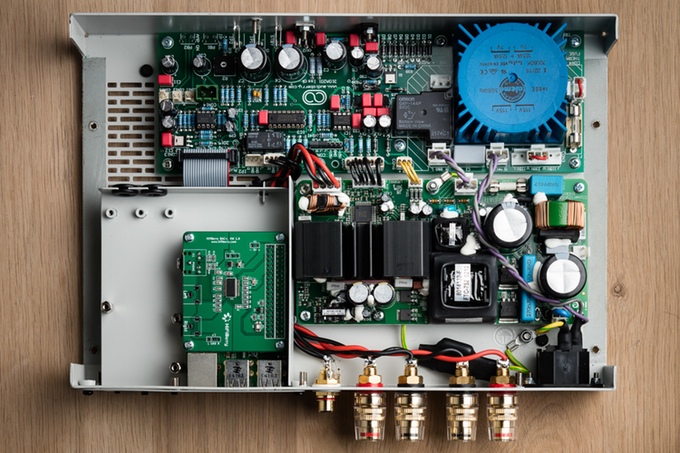
Audioberry - an Open-Source audio engineering company based in the UK has unveiled a new open source Audiophile amplifier called ZULA for streaming devices as well as mini PCs such as the Raspberry Pi.
Audioberry have taken the minimalist approach to design as it doesn’t offer tons of inputs and other unnecessary functions. The Zula amplifier has been designed to be the best in class, providing both exceptional value coupled with superb sound. A powerful (2 X 120W / 4 Ohm) Bang & Olufsen ICEpower ASX125 class D power amplifier module driven by a front end main board are the heart of ZULA and offered as standard in the basic version.
The exterior chassis has been built with brushed metal and an optional hand crafted Corian® case is also available, which will fit over the top of the amplifier if you want it to be white over the standard black colour.
Streaming Compatibility
You can connect any analogue device direct to the Zula amplifier, or pair up with a Raspberry Pi which can be installed and powered internally with the Zula Premium. Alternatively, it will also work with other external devices such as Chromecast Audio, smartphones/tablets, MP3 players, streaming devices etc. Zula also works beautifully with the wonderful Raspberry Pi DAC from IQAudIO. Zula includes a media bay so that in the future, you can add additional modules to increase Zula's functionality
Hardware
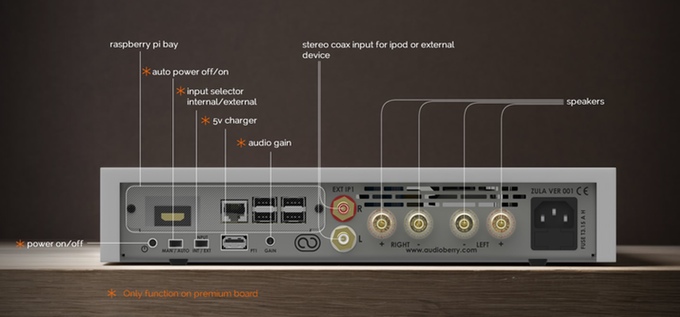
ZULA is an Open Source project and as such all schematic drawings are available free for download. Detailed specification available at Audioberry.com. ZULA is implemented at whole with THT (through hole technology) top quality components and is also offered as kit in a "money saving" version.
Add-ons
Several add-ons can be purchased separately and then can be easily mounted on ZULA at the offered optional metal bays.
1. The first is the Raspberry Pi minicomputer which offers four USB ports to connect your music streaming device, either smartphone, iPad, laptop, PC etc. The Raspberry Pi module can be purchased from Audioberry at a very good price.
2. The second is the necessary DAC converter board which can be purchased from IQaudio or HiFiBerry.
3. The third is a HDMI adaptor board which can convert the ZULA in a multimedia center.
To learn more about ZULA do visit their Kickstarter page and make a pledge if you are interested. £50,000 is required to take ZULA into production.

Raspberry Pi User Guide, 4th Edition is the "unofficial official" guide to everything Raspberry Pi 3. Written by the Pi's creator and a leading Pi guru, this book goes straight to the source to bring you the ultimate Raspberry Pi 3 manual. This new fourth edition has been updated to cover the Raspberry Pi 3 board and software, with detailed discussion on its wide array of configurations, languages, and applications. You'll learn how to take full advantage of the mighty Pi's full capabilities, and then expand those capabilities even more with add-on technologies. You'll write productivity and multimedia programs, and learn flexible programming languages that allow you to shape your Raspberry Pi into whatever you want it to be. If you're ready to jump right in, this book gets you started with clear, step-by-step instruction from software installation to system customization.
The Raspberry Pi's tremendous popularity has spawned an entire industry of add-ons, parts, hacks, ideas, and inventions. The movement is growing, and pushing the boundaries of possibility along with it—are you ready to be a part of it? This book is your ideal companion for claiming your piece of the Pi.
● Get all set up with software, and connect to other devices
● Understand Linux System Admin nomenclature and conventions
● Write your own programs using Python and Scratch
● Extend the Pi's capabilities with add-ons like Wi-Fi dongles, a touch screen, and more
The credit-card sized Raspberry Pi has become a global phenomenon. Created by the Raspberry Pi Foundation to get kids interested in programming, this tiny computer kick-started a movement of tinkerers, thinkers, experimenters, and inventors. Where will your Raspberry Pi 3 take you? The Raspberry Pi User Guide, 4th Edition is your ultimate road-map to discovery.


The Raspberry Pi IoT daughter board, MATRIX Creator, enters the maker world with many "firsts" on the Raspberry Pi:
● The first Raspberry Pi add-on with support for NFC, as well as 802.15.4-compliant short-range wireless radios like Z-Wave, ZigBee, and Thread.
● It’s also the first RPi add-on with 8 MEMs microphone array.
● The board is further touted for being the first RPi add-on with a IR remote receiver/transmitter, and the first with both an ARM MCU and a Xilinx FPGA.
Software

To simplify hardware application development, the MATRIX creator includes MATRIX OS, which allows developers to build hardware applications in just a few lines of code using JavaScript, Python and C++. Users simply select a pre-existing app from the company’s app store, or use it as a foundation for creating their software; alternative, those who prefer coding their hardware from scratch may also do so. Furthermore, developers are able to leverage flexible MATRIX machine intelligence and computer vision libraries including face detection, face recognition, and gesture recognition, with more detection algorithms soon to come.
MATRIX Creator Technical Specifications
● Processor — Xilinx Spartan 6 FPGA; Atmel ATSAM3S2C Cortex-M3 MCU
● Wireless:
◦ ZigBee
◦ Thread
◦ Z-Wave
◦ NFC reader
● Sensors:
◦ Ultraviolet
◦ Pressure
◦ Humidity
◦ Temperature
◦ 3D accelerometer, gyroscope, magnetometer
● Other features:
◦ 8x MEMs microphone array
◦ RGBW LED light array
◦ IR RX/TX for remote controller compatibility
◦ Infrared ring for the Raspberry Pi NoIR camera
● Other I/O:
◦ 2x ADC channels
◦ 17x digital GPIOs
◦ SPI, I2C, UART
Buying
The Matrix Creator is available for sale at indiegogo with special computer vision kits available from $99 ($112 including shipping). More information may be found at the Matrix Creator product page and indiegogo page.

Almost all web apps and web games that work in Chrome can be ported to Raspberry Pi now using the NW.js port. However performance can be issue because RPi 1 and Zero are not very powerful.
Since NW.js includes Node.js, the developers can access hardware (GPIO, USB, etc.) without problems and do any thing that Node.js can do and they can provide a GUI if they want since NW.js also includes Chromium. All packaged in a binary so it is interesting for many projects.
The instructions can be found in the GitHub repository of the port and also in the official NW.js repository (in the part where they talk about the old version called node-webkit).
Compatibility
• Raspberry Pi Zero, all models (untested)
• Raspberry Pi, all models
• Raspberry Pi 2, all models (untested)
• Raspberry Pi 3, all models
• Other devices with compatible hardware (untested)
Source: [GitHub]

The system includes a 160W amplifier driven by a 5/5 star rated Hi-Res Digital to Analogue converter sound card for the Raspberry Pi, the Pi-DAC+. As the Pi-DAC+ uses TI PCM5122 DAC, full Linux device driver support is already built into the official Raspbian Linux distribution.

● Full-HD audio - up to 24-bit/192kHz playback
● Integrated hardware volume control (via ALSA), full 2v RMS
● Class leading audio; 112db SNR, and -93db THD
● Audiophile TI Burr Brown 32-bit/384kHz DAC (TI PCM5122)
● Advanced ESD protection
● Uses the digital I2S audio signals to reduce CPU load over USB audio solutions
Software
The project software solution is based on Max2Play. Max2Play is a beginners-friendly operating system for the Raspberry Pi with a focus on Audio. The Max2Play interface is accessible through the browsers of your PC's, tablets or smartphones. No Linux experience or console commands necessary. The WiFi setup is very easy thanks to WPS functionality. With the help of plugins (extensions), they are configured and installed easily: So you can use all plugins and features you know from Max2Play, like Squeezebox Server, Jivelite, Kodi and others.
● Media Center with just one click
● easiest implementation of Multi-Room Audio Setups
● Configuration of the IQaudIO sound card
● Set up (mount) storage devices (USB flash drives, NAS, etc.) and network paths with one click
● Over 30 plugins available
● Max2Play lives by and through the community with support of the community in the development of new plugins.
Multiroom Audio Solution Working

With the integrated Squeezbox Server all your SonoPis can play audio in sync. As shown in the graphic above, one of the devices has to be a server to which every other device connects. So all of them have the same information with correct timing. However you can control the playback with each SonoPi.
SonoPi Features

To learn more about the new Raspberry Pi Audio Injector Sound Card do visit their Kickstarter page and make a pledge if you are interested.

Interface
User Interface
User interface is the primary interface for end users. That is where the smart home owner gets and applies the effective management and control tools. intraHouse's user interface is designed to work on a great variety of devices and is accessible from a Web-browser. It means that you won’t need to install any software on your personal computer, tablet or smart phone. It also means that the user interface will be compatible with any operational system (Android, iOS , Linux, Mac OS X, Windows). It is designed keeping simplicity in mind and it's very user friendly. The system interface supports multiple access simultaneously and synchronizes across all devices in real time.
 |
| User Interface |
Installer Interface
Installer interface is intended for project and building managers and focuses mainly on system setup and settings. This panel consists of all the system settings and customization panes. It's fully customizable interface allows to perfectly fit control panels in the interior design, adjust the menu look, change pictographs etc. Any changes that are made in Project Manager will be saved on the server and become immediately accessible for all system users. Users can also apply various themes that comes along with it and customize it accordingly.
 |
| Installer Interface |
In the basic version of intraHouse system, three standard modes are available: Day, Night and Economy.
Normally those three modes, together with scenes, are enough to provide fully-featured energy efficient and comfortable management of a flat or a house.
You can adjust those three modes for other purposes. For example, you can have such modes as “Business Hours”, “Off Hours”, “Holidays”. For you summer house, you can have “Home”, “Away”, “In Conservation”.
Scenes
What is a scene? In a typical Smart Home system, a scene normally means a lighting scene.
In intraHouse system, the concept of Scene has a broader meaning: it means management of all devices in accordance with particular algorithms.
All devices in intraHouse system can operate without scenes: you can turn them on/off and watch the change in their condition.
System Structure
Functionally, intraHouse system comprises three main components: intraHouse.Server, intraHouse.Plugins and intraHouse.Apps

intraHouse.Server
It includes Kernel (the system’s core), Script Engine, Front Server (Web server), Back Server (communication with devices). intraHouse Server is based on Node.js platform.
intraHouse.Apps
intraHouse.Apps are front-end web applications that ensure visualization. These applications work on any devices with a web-browser: i.e., smart phones, tablets and computers. Modern TV sets also work with intraHouse system. They are implemented using HTML5, CSS3, jQuery, Socket.io and other technologies.
intraHouse.Plugins
Plugins are intended for connection of equipment of different manufacturers. They are drivers that link shortcuts in the interface with actual devices.
Live Demo
If you are interested in intraHouse's home automation package, you can check out the live demo of the interface here.
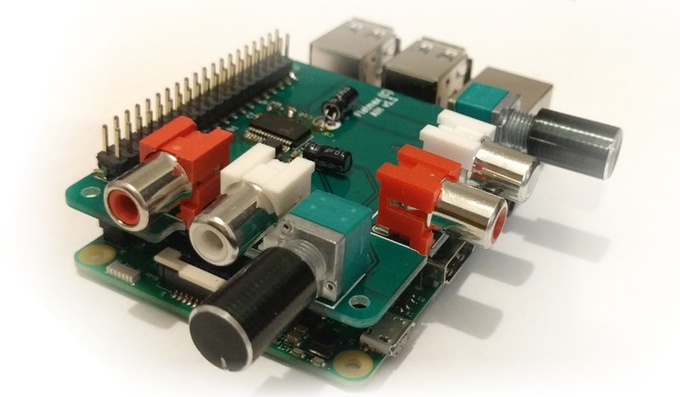
For all you audio lovers out there, Flatmax Studios have come up with a decent quality Audio Injector Sound Card for the Raspberry Pi that uses both DAC and ADC for audio out and or in. It’s a cost effective solution for projects that needs decent audio capabilities. There are so many different projects which you can create using this sound card - audio to and from almost any of the devices on the Raspberry Pi, such as disk, USB, HDMI, WiFi, the Ethernet network and so on.
The Raspberry Pi Audio Injector Sound Card provides 2 channels of audio input and 2 channels of audio output. It comes equipped with volume knobs for controlling both inputs and outputs. Apart from these, it also includes a headphone preamp+jack and an inbuilt electret microphone. The headphone jack is expected to deliver 50 mW max power into 16 Ohm and 30 mW max power into 32 Ohm headphones.
This sound-card boasts low jitter operation using a crystal driven codec as the timing master. It also allows you to stack more Raspberry Pi HATS on top if required.
Specifications:
· Microphone: Inbuilt electret microphone with mixer controls. Allowing voice control or other applications.
· Headphones: 50 mW max power into 16 ohm and 30 mW max power into 32 Ohm headphones (check the updates to see more)
· Driver : ALSA
· Linux : Already integrated into the Raspberry Pi kernel. If you have an older version of the kernel, simply run "rpi-update" if you need to. Edit /boot/config.txt and set dtoverlay=audioinjector-soundcard
· DAC and ADC : 96 kHz, 32 bit audio.
· GPIO : Standard 40 Pin header, broken out above the add on card to accept more add on cards and hats.
To learn more about the new Raspberry Pi Audio Injector Sound Card do visit their Kickstarter page and make a pledge if you are interested.
Source: Kickstarter

FullPageOS is set up to boot into a full-screen Chromium window on boot. All you need to do is install FullPageOS on an SD card, then edit a TXT file to include your Wi-Fi network info and the URL you want it to load up. Webpage can be changed from /boot/fullpageos.txt This is a pretty niche little distribution for the Pi, but it should make those dashboards and other HUDs much quicker to set up.
For more details visit: FullPageOS | GitHub
