
Developer Matt Wagner has managed to cram an almost entirely self-contained computer setup inside an Altoids mint box. He came up with the idea around 2012 when Raspberry Pi was first launched, but the size constraints kept the project from going forward. He had to wait a couple of years until the company eventually released the ultra compact Pi Zero and its launch made the project possible.
He has made two versions of his project, the first version of the PiMiniMint includes a screen, WiFi, Bluetooth, 32GB of storage, an infrared camera, and a full size USB port. All of this fit inside the Altoids tin. The second version has a battery — 2000mAh reportedly lasting for 6-8hrs. But there is only so much space to perform small miracles so in this version the camera had to go. This makes it a wireless standalone computer as you can control it with Bluetooth keyboard and mouse while connecting to the outside world over WiFi.
To learn more about PiMiniMint, check out how Wagner [MWAGNER] built this quirky PC here.

It comes with a real time safety alert system, navigation and voice-to-text technology. It also lets you build your own driving apps and make Dride as intelligent as you are. Another amazing feature of Dride is a cloud based DVR for drivers to save their dash-cam footage and share the footage with world-wide driving community while storing GPS locations and license plate numbers. With the use of Dride Cloud, reckless drivers will be encouraged to drive more responsibly, since they know that their dangerous speed or reckless actions will be documented and reported.
 |
| ADAS alert system warns you if you are in danger and watches your back during your journey. |
Companion App

 |
| Available on the App Store and Google Play |
Hands-Free
Dride is also equipped with Alexa assistant allowing you to interact with it on the road You can also have Dride read and write your text messages and navigate you to your destination so that you can keep your eyes off your phone and on the road!

To learn more about Dride do visit their KickStarter page and make a pledge if you are interested.
Source: Kickstarter

UNiSET Company has come up with a ready-to-use add-on for Raspberry Pi which is capable of high-accuracy distance measurements for both indoor and outdoor environments.
SEQUITUR RANGING
SEQUITUR RANGING allows you measuring the distance between two Raspberry Pi (i.e., ranging) with accuracy within a few centimeters and operating distance of hundreds of meters. It works with Raspberry Pi computers equipped with the SEQUITUR Pi boards. Integrated solutions with stand-alone tags and extended functionalities are available with the professional version. SEQUITUR RANGING offers the access to the basic ranging and communication functionalities that allow you to develop your own positioning application.
SEQUITUR RANGING Kit includes:
- 2 SEQUITUR Pi boards
- 2 licenses for SEQUITUR RANGING firmware (running on Raspberry Pi)
- Demo application for fast setup and use (all platforms)
- API examples (C++, JAVA, Matlab)
- Extensive Technical Documentation
SEQUITUR InGPS
SEQUITUR InGPS Lite allows you localizing your Raspberry Pi, by deploying your own real-time localization system, capable of working also indoor with accuracy within a few centimeters and operating distance of hundreds of meters.
It works with Raspberry Pi computers equipped with the SEQUITUR Pi boards. Integrated solutions with stand-alone tags and extended functionalities are available with the Professional version.
SEQUITUR InGPS Lite Kit includes:
- 5 SEQUITUR Pi boards
- 1 license for SEQUITUR InGPS Lite firmware - TAG (running on Raspberry Pi)
- 4 licenses for SEQUITUR InGPS Lite firmware - ANCHORS (running on Raspberry Pi)
- Demo application for fast setup and use (all platforms)
- API examples (C++, JAVA, Matlab)
- Extensive Technical Documentation
SEQUITUR-Pi Specifications:
- Radio interface based on the Decawave© chipset implementing the IEEE802.11.4a UWB standard
- 4 selectable frequency bands from 3.5 to 6.5 GHz
- Selectable data rates: 110 kbps, 850 kbps, 6.8 Mbps
- Compliant with FCC & ETSI UWB spectral masks
- Up to 7 cm ranging accuracy
- Up to 200 m transmission range in favorable propagation conditions at 110 kbps
- Fully compatible with Raspberry Pi
- On-board 3D accelerometer
- On-board 3D gyroscope
- On-board 3D magnetometer
- On-board barometer
- Accessibility of Raspberry Pi UART, I2C and GPIO.
User Interface software
 |
| SEQUITUR RANGING Demo Application |
- End user general purpose graphical interface to SEQUITUR RANGING.
- Fully programmable and operating through simple string commands via UDP packets for short time-to-product developments (example: “get range from node 1”).
- Platform and programming language independent. Matlab, JAVA and C examples provided.
- Multiple clients and/or user-developed applications can simultaneously interrogate SEQUITUR RANGING.
- Easy control of Raspberry Pi UART and GPIO.
- Available for OS-X, iOS, Windows and Linux platforms.
To learn more about SEQUITUR-Pi do visit their website or watch the demo video below-

Basically the Compute Module 3 offers the same connections as a Raspberry Pi. However, these are in the form of contacts on the board. The number of contacts and dimensions of the PCB correspond to those of a SO-DIMM memory latch (68 x 31 mm) - but the compatibility is purely mechanical, otherwise there is no similarity with a memory latch.
For development purposes, a breakout board is also provided, which carries out the contacts in the form of pins and corresponding terminals. It offers, among other things, an HDMI and USB port as well as a micro SD card slot.
The new module is basically compatible with the original Compute Module. However, in the data sheet indicated that the Compute Module 3 is one millimeter higher and more power than the original.
The Compute Module 3 will cost around $30 , the Lite version $25. The original Compute Module is also reduced to $25.
Source: raspberrypi.org

The smart camera captures video frames and directly processes them on the quad-core processor that is in the camera. Results are streamed over USB to a host computer, and/or over serial port to a micro-controller. The JeVois smart camera can find interesting objects in cluttered scenes using a visual attention algorithm, can recognize some of these things using deep neural networks, can detect and decode QR-codes, barcodes, and ArUco augmented-reality markers, can detect and follow roads, can detect human faces, or can even be used as an eye-tracker. Many of these algorithms operate at 30, 60, or 120 frames/s. The software is open-source so that anyone can implement their own machine vision algorithms.
- Visual attention: find interesting things in cluttered environments
- Gist: recognize different places, e.g., recognize a kitchen vs a bedroom
- Read digits, recognize objects using deep neural networks
- ArUco: detect & decode simple patterns
- Detect & decode Qr-codes and bar codes
- Background subtraction: find moving things
- GPU image processing examples
- NEON-accelerated image processing example
- Build your own 120Hz eye tracker
- Dense SIFT feature extraction
- Quad-core edge detection demo
- Detect and track objects by their color
- Fast optical flow
- Detect and follow roads for autonomous cars
- Detect and recognize objects using SURF
- Segment images into super pixels
- Save video to micro-SD for later analysis
Hardware and Software frameworks:

The JeVois framework operates as follows: video is captured from the camera sensor, processed on the fly through some machine vision algorithm directly on the camera's own processor, and the results are streamed over USB to a host computer and/or over serial to a micro-controller.
To the host computer, the JeVois smart camera is just another USB camera. Different vision algorithms are selected by changing USB camera resolution and frame rate. Users or machines can also interact with the JeVois smart camera, change its settings, or listen for text-based vision outputs over serial link (both hardware serial and serial-over-USB are supported).
Three major modes of operation:
• Demo/development mode: the smart camera outputs a demo display over USB that shows the results of its analysis, possibly along with simple results communicated over serial port (e.g., coordinates and content of any Qr-code that has been identified).
• Text-only mode: the smart camera provides no USB output, but only text strings, for example, commands for a pan/tilt controller.
• Pre-processing mode: the smart camera outputs video that is intended for machine consumption, for example an edge map computed over the video frames captured by the camera sensor, or a set of image crops around the 3 most interesting objects in the scene. This video can then be further processed by the host computer, for example, using a massive deep neural network running on a cluster of high-power GPUs to recognize the three most interesting objects that the smart camera has detected. Text outputs over serial are of course also possible in this mode.
But, really, anything is possible, since the whole JeVois software framework is open-source.
Specs at a glance:

The JeVois smart camera is a complete Linux computer. It can run on its own, without a host PC. Thanks to the cooling fan, it can run under full processing load without overheating and while maintaining a constant 1.34 GHz CPU speed.
Developer friendly
- All software open source (GPL)
- Full Linux operating system, boots in 5 seconds
- Custom kernel modules for camera & USB
- Buildroot framework to easily add software packages and create SD image
- JeVois C++17 video capture, processing & streaming framework
- Switch machine vision modules on the fly by changing output resolution
- Download pre-programmed machine vision modules or create your own
- CMake build system
- Full cross-compiler suite (compile all software on your desktop)
- Compile and run the same software on desktop and on JeVois hardware, at the same time (very useful for development & debugging)
- Operating system and vision software all stored on micro-SD card, hacker-friendly and unbrickable. Smart camera can use microSD to save data.
- Included libraries:
• Neuromorphic algorithms for visual attention & scene understanding
• OpenCV 3.2 machine vision algorithms
• All opencv-contrib modules (object recognition, ArUco, etc)
• ZBar library for barcode & QRcode detection and decoding
• tiny-dnn library for deep convolutional neural networks
• GPU-accelerated image processing using OpenGL ES2.0 shaders
• Support for NEON multimedia processor instructions
• Vlfeat library for visual feature computation
• OF_DIS library for fast motion flow computation
• Eigen3, TBB, OpenMP, etc
Developer friendly
- All software open source (GPL)
- Full Linux operating system, boots in 5 seconds
- Custom kernel modules for camera & USB
- Buildroot framework to easily add software packages and create SD image
- JeVois C++17 video capture, processing & streaming framework
- Switch machine vision modules on the fly by changing output resolution
- Download pre-programmed machine vision modules or create your own
- CMake build system
- Full cross-compiler suite (compile all software on your desktop)
- Compile and run the same software on desktop and on JeVois hardware, at the same time (very useful for development & debugging)
- Operating system and vision software all stored on micro-SD card, hacker-friendly and unbrickable. Smart camera can use microSD to save data.
- Included libraries:
• Neuromorphic algorithms for visual attention & scene understanding
• OpenCV 3.2 machine vision algorithms
• All opencv-contrib modules (object recognition, ArUco, etc)
• ZBar library for barcode & QRcode detection and decoding
• tiny-dnn library for deep convolutional neural networks
• GPU-accelerated image processing using OpenGL ES2.0 shaders
• Support for NEON multimedia processor instructions
• Vlfeat library for visual feature computation
• OF_DIS library for fast motion flow computation
• Eigen3, TBB, OpenMP, etc
Host Computer Requirements
The JeVois smart camera can work as a standalone computer, with no USB video streaming. In such case, one would usually simply stream commands to an Arduino or similar over the serial port. All you need then is to provide power to the JeVois camera's mini-USB connector.
For video streaming over USB:
Linux (including Raspberry Pi): Works out of the box, no drivers needed, all functionality is available. You can switch between different vision processing modes on the fly and at runtime, by selecting different camera resolutions and frame rates on your host computer. For example, [email protected] may run the visual attention algorithm, while [email protected] may run the QRcode detection algorithm. A configuration file on the MicroSD card establishes the mapping between USB video resolution and frame rate, camera sensor resolution and frame rate, and vision algorithm to run.
Windows, Mac OS X: Streaming works but selecting among different available video resolutions has become increasingly difficult with newer versions of Windows and OS X. It seems that these operating systems do not want to let you choose a camera resolution or frame rate. This choice, however, is how one can switch on the fly between different vision algorithms on the JeVois camera. One workaround is to configure your JeVois smart camera with only one vision algorithm (achieved by commenting out entries for other resolutions in a configuration file on the MicroSD card). Then the host computer will have no choice but to use that one.
Android: The camera is detected but streaming video does not work yet. We are working on this and we suspect this has to do with deviations from the USB video class (UVC) standard on the Android side. For example, a USB packet sniffer has revealed that the Android device insists on querying camera controls that were not declared as being supported by the JeVois hardware.
iOS: The JeVois smart camera, and any other USB camera we have tried, are currently reported as not being a supported device. This may change in the future.
To learn more about JeVois do visit their KickStarter page and make a pledge if you are interested.
Source: Kickstarter

Raspberry Pi with Java: Programming the Internet of Things (IoT) fills an important gap in knowledge between seasoned Java developers and embedded-hardware gurus, taking a project-based approach to skills development from which both hobbyists and professionals can learn. By starting with simple projects based on open-source libraries such as Pi4J, hobbyists can get immediate results without a significant investment in time or hardware.
Later projects target simplified industrial use cases where professionals can start to apply their skills to practical problems in the fields of home automation, healthcare, and robotics. This progression prepares you to be an active participant in the IoT revolution that is reshaping our lives.
For the hobbyist:
● Hardware used in projects is affordable and easily accessible
● Follows a project-based learning approach with a gradual learning curve
● Projects are based on open-source code repositories with commercial friendly licenses
For the professional computer engineer:
● Uses an industry-standard platform that allows for high performance, secure, production-ready applications
● Introduces Java SE Embedded for large devices and Java ME Embedded for small devices
● Code is portable to a wide variety of ARM and MIPS based platforms
● Provides practical skill development with advanced projects in the fields of home automation, healthcare, and robotics


WDLabs, a part of Western Digital (WD) Corporation has launched a new line of HDD called WD PiDrive offering storage solutions just for the Raspberry Pi. It comes in a slim form factor of 7 mm and is available in three versions offering different storage capacities. Based off of Western Digital’s Blue drives (as per Ars), they have been modified to draw all the power it needs straight from the bundled USB cable. Gone is the traditional SATA connector, and in its place, a USB interface has been implemented. WD insists it will allow for “sufficient performance to deliver maximum USB data transfer rates.”
Hassle-Free OS Installer
The WD PiDrive Foundation Edition device includes a microSD card that comes preloaded with a custom version of NOOBS (New Out of the Box Software) pre-configured with Raspbian PIXEL and Raspbian Lite. With this OS installer and starter operating systems, you can get started right out of the box, or download and install multiple Raspbian OSs directly onto your flash or HDD drive.
Setting up the WD PiDrive

The user has no intervention to do, everything is already ready in the system provided by WD Labs.

Final Verdict
So, what makes this kit different from any other hard drive? First, it comes with a 4GB microSD card which you can use for operating system files. With BerryBoot, it's easier to have multiple operating systems on the same storage drive and boot up from external drives. Second, it comes with a special USB 3.0 cable that’s designed to connect to the USB port and the power port of a Raspberry Pi letting you power both devices using a single cable. This eliminates the need of any additional converters or other hardware.
The only bottleneck is that you’re limited to the USB 2.0 bus of Raspberry Pi for connecting the drives. Moreover, this bus is also shared with the network interface, resulting in that you get around 31MB/s and 24MB/s in read/write speed respectively
Overall, it’s a great little product at a decent price and an excellent companion to the Raspberry Pi. For more details on the Western Digital PiDrive Foundation Edition jump over to the official WD website where it is now available to purchase for $37.49.
Source: WD
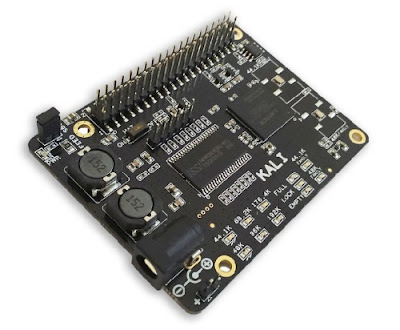
The Kali takes the digital audio signals (I2S) from Raspberry Pi through the on board FPGA based FIFO and does the re-clocking of the signal before sending it to the DAC.
So, What Is I2S?
I2S is a communication protocol specifically designed to carry digital audio data. The main advantage over the long establish SPDIF interface is that the I2S interface has a separate word clock. Theoretically, this will allow for lower transmission jitter.
But in theory the Raspberry Pi has a bit of a problem with its I2S output. Since the only clock on board the Raspberry Pi is a 19.2MHz crystal, it should have trouble generating proper clocks for its I2S output. For example, for 44.1KHz audio, the LR Clock must be running at precisely 44.1KHz. That is not possible, since the frequency is not a multiple of 19.2MHz. Thus, the frequency can be either 19.200.000 / 435 = 44.138KHz or 19.200.000 / 436 = 44.0366KHz. This is a limitation of the Broadcom BCM2835 in conjunction with the 19.2MHz crystal and there is nothing that can be done. More detailed explanation can be found on Dimdim's Blog.
Kali the Goddess of Time
Every SBC has a crystal that it used to send digital signals to your DACs.
The accuracy of this crystal is very important in how well the DAC will transform the digital signal into analog sounds. Simply put: a better crystal means a better sound! Most SBCs use a very cheap crystal with lots of jitter in order to save costs.
Furthermore, there are 2 kinds of frequencies for digital files: 44.1Khz (wave files) and 48khz (streamed music). Some SBCs (like RPIs) can output only 48Khz, so imagine the degradation of the sound that was recorded at a different frequency.
Kali will solve both of those problems
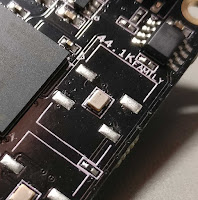 |
| NDK clocks |
Re-timing is performed through a Lattice MachXo3 LCMXO3L-4300C PLD / FPGA with 4300 LUTs along with a 4Mbit FIFO RAM which buffers 700ms of audio.
“Since FPGAs introduce about 200ps of jitter, the NDKs re-clock the buffered data outside the FPGA and provide a MCLK/BCLK that is direct from crystal to provide an almost jitter-free clock to your DAC,” claimed Allo.
Features
• The basic design includes FPGA based FIFO board
• I2S input & output: 44.1 KHz, 48 KHz, 88.2 KHz, 96 KHz, 176.4 KHz, 192 KHz ,384 KHz - 16bit, 24bit or 32bit
• FIFO Memory: 4MB SRAM
• LED indicators (Power, Full, Lock, Empty, Sample Rate, Mclk)
• DC power supply: (5V/3A) with Filter circuits
• Multi-frequency output capability to support the full I2S working range from 44.1 KHz to 196 K
• Automatically switching frequencies according to the input I2S signals
• Extremely fast and very low propagation delay Flip-Flops are added on I2s signals
• output from FPGA, for synchronization with MCLK before sending to DAC
• Ultra-low-noise voltage regulators for optimal audio performance
• Integrated EEPROM for automatic configuration (with write-protection)
Tech Specs
• LED indicators (Power, Full, Lock, Empty, Sample Rate, Mclk)
• DC power supply: (5V/3A) with Filter circuits
• Operating Temperature Range is -25C to 85C
• The Kali board size: LWH = 58mm * 77.54mm * 23.8mm
Note: The Kali Reclocker can only be combined with DACs running in Slave Mode, that is it will have to take its BCLK from the RPi and not the other way around. You can use Piano 2.1 - they were designed to work perfectly together!
The million dollar question (actually $75): how does it sound?
Well, the music will "open up". The stage will sound bigger, more tri-dimensional. You will hear sounds, words, instruments that were drowned before in a sea of digital mud. It's like Kali manages to extract more audio content from the same 44.1K/16bit source material. Imagine going from SD TV to HDTV!
To sum things up:
• It’s truly a game changer! The music became more “real”
• Sound improvement is really noticeable: Details and instrumental separation are vastly better
• With the Piano HiFi DAC, it makes a great bang\buck combo!
Support & Downloads
Kali Tech Manual: https://allo.com/documents/sparky/tech-manuals/Kali-Tech-Manual.pdf
Kali I2S Pinout From SBC: https://allo.com/documents/sparky/Kali-I2S-Pinout-From-SBC.pdf
Kali I2S Pinout to DAC Boards: https://allo.com/documents/sparky/Kali-I2S-Pinout-to-DAC-Boards.pdf

So, if you have been planning to build your very own Raspberry Pi powered handheld emulation console, you might be interested in a new DIY kit called RaspiBoy designed by Pierre-Louis Boyer from 8B CRAFT. It provides you with everything you need to construct your portable Raspberry Pi powered retro gaming handheld console.

The RaspiBoy comes as a kit, with easy mounting tutorial PDF and video. Thanks to the software, RaspiBoy can run all kinds of older games from original Game Boy titles up to Game Boy Advance, as well as classic games for consoles like Super Nintendo, Atari, MaMe and so on. To install a game all that you would need is a ROM file. You can legally download ROM of any unlicensed games on the internet. Then to install the ROM you just have to put the ROM file on a USB-key and plug it into the RaspiBoy. That's it! (copy and installation is automatic!)
Features:
● HDMI Out: You can connect RaspiBoy to your big TV and the video output will automatically switch from RaspiBoy to your TV!
● Up to 4 players: You can connect USB game pads on RaspiBoy! (3 players with basic kit and 4 players with extra-usb kit)
● Speaker + headphone jack + Thumbwheel potentiometer to tune volume
● 4 LED for battery status
To learn more about RaspiBoy do visit their KickStarter page and make a pledge if you are interested.
Source: KickStarter
