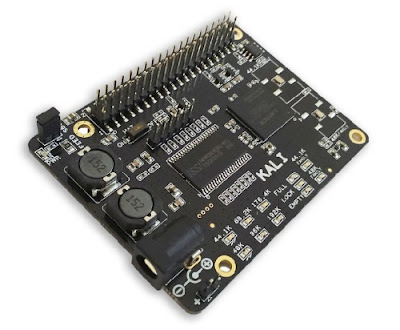
The Kali takes the digital audio signals (I2S) from Raspberry Pi through the on board FPGA based FIFO and does the re-clocking of the signal before sending it to the DAC.
So, What Is I2S?
I2S is a communication protocol specifically designed to carry digital audio data. The main advantage over the long establish SPDIF interface is that the I2S interface has a separate word clock. Theoretically, this will allow for lower transmission jitter.
But in theory the Raspberry Pi has a bit of a problem with its I2S output. Since the only clock on board the Raspberry Pi is a 19.2MHz crystal, it should have trouble generating proper clocks for its I2S output. For example, for 44.1KHz audio, the LR Clock must be running at precisely 44.1KHz. That is not possible, since the frequency is not a multiple of 19.2MHz. Thus, the frequency can be either 19.200.000 / 435 = 44.138KHz or 19.200.000 / 436 = 44.0366KHz. This is a limitation of the Broadcom BCM2835 in conjunction with the 19.2MHz crystal and there is nothing that can be done. More detailed explanation can be found on Dimdim's Blog.
Kali the Goddess of Time
Every SBC has a crystal that it used to send digital signals to your DACs.
The accuracy of this crystal is very important in how well the DAC will transform the digital signal into analog sounds. Simply put: a better crystal means a better sound! Most SBCs use a very cheap crystal with lots of jitter in order to save costs.
Furthermore, there are 2 kinds of frequencies for digital files: 44.1Khz (wave files) and 48khz (streamed music). Some SBCs (like RPIs) can output only 48Khz, so imagine the degradation of the sound that was recorded at a different frequency.
Kali will solve both of those problems
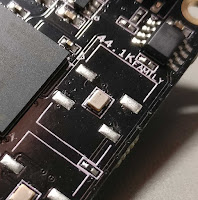 |
| NDK clocks |
Re-timing is performed through a Lattice MachXo3 LCMXO3L-4300C PLD / FPGA with 4300 LUTs along with a 4Mbit FIFO RAM which buffers 700ms of audio.
“Since FPGAs introduce about 200ps of jitter, the NDKs re-clock the buffered data outside the FPGA and provide a MCLK/BCLK that is direct from crystal to provide an almost jitter-free clock to your DAC,” claimed Allo.
Features
• The basic design includes FPGA based FIFO board
• I2S input & output: 44.1 KHz, 48 KHz, 88.2 KHz, 96 KHz, 176.4 KHz, 192 KHz ,384 KHz - 16bit, 24bit or 32bit
• FIFO Memory: 4MB SRAM
• LED indicators (Power, Full, Lock, Empty, Sample Rate, Mclk)
• DC power supply: (5V/3A) with Filter circuits
• Multi-frequency output capability to support the full I2S working range from 44.1 KHz to 196 K
• Automatically switching frequencies according to the input I2S signals
• Extremely fast and very low propagation delay Flip-Flops are added on I2s signals
• output from FPGA, for synchronization with MCLK before sending to DAC
• Ultra-low-noise voltage regulators for optimal audio performance
• Integrated EEPROM for automatic configuration (with write-protection)
Tech Specs
• LED indicators (Power, Full, Lock, Empty, Sample Rate, Mclk)
• DC power supply: (5V/3A) with Filter circuits
• Operating Temperature Range is -25C to 85C
• The Kali board size: LWH = 58mm * 77.54mm * 23.8mm
Note: The Kali Reclocker can only be combined with DACs running in Slave Mode, that is it will have to take its BCLK from the RPi and not the other way around. You can use Piano 2.1 - they were designed to work perfectly together!
The million dollar question (actually $75): how does it sound?
Well, the music will "open up". The stage will sound bigger, more tri-dimensional. You will hear sounds, words, instruments that were drowned before in a sea of digital mud. It's like Kali manages to extract more audio content from the same 44.1K/16bit source material. Imagine going from SD TV to HDTV!
To sum things up:
• It’s truly a game changer! The music became more “real”
• Sound improvement is really noticeable: Details and instrumental separation are vastly better
• With the Piano HiFi DAC, it makes a great bang\buck combo!
Support & Downloads
Kali Tech Manual: https://allo.com/documents/sparky/tech-manuals/Kali-Tech-Manual.pdf
Kali I2S Pinout From SBC: https://allo.com/documents/sparky/Kali-I2S-Pinout-From-SBC.pdf
Kali I2S Pinout to DAC Boards: https://allo.com/documents/sparky/Kali-I2S-Pinout-to-DAC-Boards.pdf

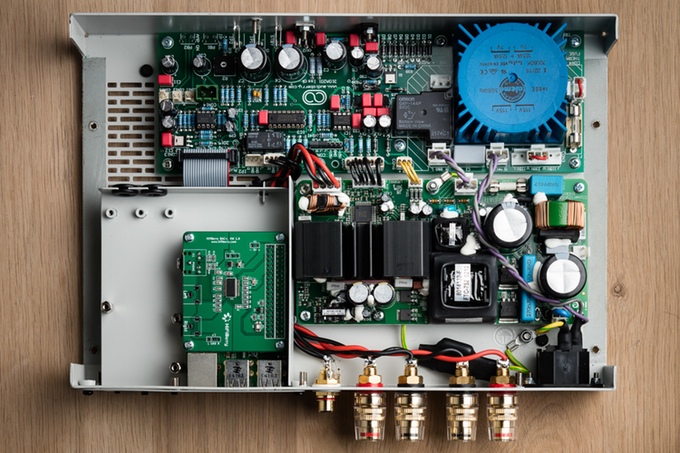
Audioberry - an Open-Source audio engineering company based in the UK has unveiled a new open source Audiophile amplifier called ZULA for streaming devices as well as mini PCs such as the Raspberry Pi.
Audioberry have taken the minimalist approach to design as it doesn’t offer tons of inputs and other unnecessary functions. The Zula amplifier has been designed to be the best in class, providing both exceptional value coupled with superb sound. A powerful (2 X 120W / 4 Ohm) Bang & Olufsen ICEpower ASX125 class D power amplifier module driven by a front end main board are the heart of ZULA and offered as standard in the basic version.
The exterior chassis has been built with brushed metal and an optional hand crafted Corian® case is also available, which will fit over the top of the amplifier if you want it to be white over the standard black colour.
Streaming Compatibility
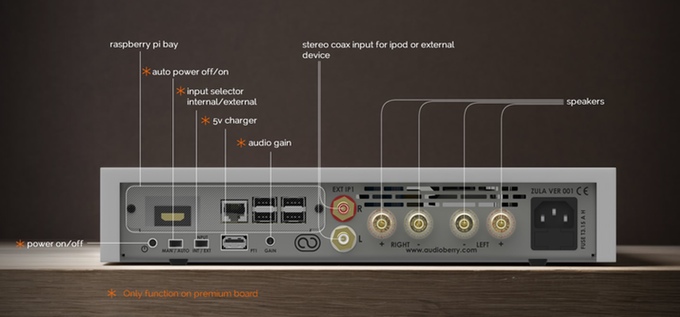
You can connect any analogue device direct to the Zula amplifier, or pair up with a Raspberry Pi which can be installed and powered internally with the Zula Premium. Alternatively, it will also work with other external devices such as Chromecast Audio, smartphones/tablets, MP3 players, streaming devices etc. Zula also works beautifully with the wonderful Raspberry Pi DAC from IQAudIO. Zula includes a media bay so that in the future, you can add additional modules to increase Zula's functionality
Hardware
ZULA is an Open Source project and as such all schematic drawings are available free for download. Detailed specification available at Audioberry.com. ZULA is implemented at whole with THT (through hole technology) top quality components and is also offered as kit in a "money saving" version.
Add-ons
Several add-ons can be purchased separately and then can be easily mounted on ZULA at the offered optional metal bays.
1. The first is the Raspberry Pi minicomputer which offers four USB ports to connect your music streaming device, either smartphone, iPad, laptop, PC etc. The Raspberry Pi module can be purchased from Audioberry at a very good price.
2. The second is the necessary DAC converter board which can be purchased from IQaudio or HiFiBerry.
3. The third is a HDMI adaptor board which can convert the ZULA in a multimedia center.
To learn more about ZULA do visit their Kickstarter page and make a pledge if you are interested. £50,000 is required to take ZULA into production.
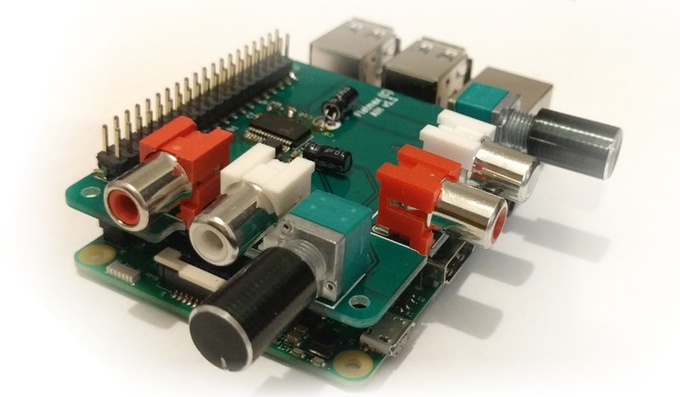
For all you audio lovers out there, Flatmax Studios have come up with a decent quality Audio Injector Sound Card for the Raspberry Pi that uses both DAC and ADC for audio out and or in. It’s a cost effective solution for projects that needs decent audio capabilities. There are so many different projects which you can create using this sound card - audio to and from almost any of the devices on the Raspberry Pi, such as disk, USB, HDMI, WiFi, the Ethernet network and so on.
The Raspberry Pi Audio Injector Sound Card provides 2 channels of audio input and 2 channels of audio output. It comes equipped with volume knobs for controlling both inputs and outputs. Apart from these, it also includes a headphone preamp+jack and an inbuilt electret microphone. The headphone jack is expected to deliver 50 mW max power into 16 Ohm and 30 mW max power into 32 Ohm headphones.
This sound-card boasts low jitter operation using a crystal driven codec as the timing master. It also allows you to stack more Raspberry Pi HATS on top if required.
Specifications:
· Microphone: Inbuilt electret microphone with mixer controls. Allowing voice control or other applications.
· Headphones: 50 mW max power into 16 ohm and 30 mW max power into 32 Ohm headphones (check the updates to see more)
· Driver : ALSA
· Linux : Already integrated into the Raspberry Pi kernel. If you have an older version of the kernel, simply run "rpi-update" if you need to. Edit /boot/config.txt and set dtoverlay=audioinjector-soundcard
· DAC and ADC : 96 kHz, 32 bit audio.
· GPIO : Standard 40 Pin header, broken out above the add on card to accept more add on cards and hats.
To learn more about the new Raspberry Pi Audio Injector Sound Card do visit their Kickstarter page and make a pledge if you are interested.
Source: Kickstarter
