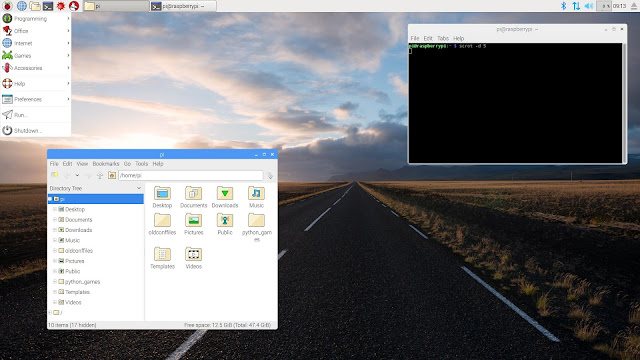
Raspbian is one of the most popular distros out there for Raspberry Pi based on massively popular Debian distribution. Despite the limitations of Raspberry Pi hardware, an operating system like Raspbian works very well and is very intuitive and easy to use. The only fault with this operating system is that it has a rather ugly interface.
After years without change, its graphical interface has finally undergone an overhaul and the result seems rather successful. It is named as PIXEL which now officially stands for “Pi Improved Xwindows Environment, Lightweight”.
New Images and Start-up Friendly
The latest set of changes are almost entirely to do with the appearance of the desktop. When you boot it up the first thing you would notice is that a graphical splash screen has replaced the trail of cryptic boot messages of the console. It also displays the version number for the Raspbian image at the bottom-right of the splash image. Moreover now you can choose from 16 preset wallpapers, appearing from the same home screen. The default icons have also been changed, thus changing the old and ugly icons from the original version. The system uses the font type Infinality and windows have a curved and flatter, more pleasant modern touch.
New Applications
Pixel now includes new applications such as RealNVC (now integrated into the system), SenseHAT and an initial version of Chromium for Pi, instead of Epiphany which has started to show its age. Chromium for Pi uses the Pi’s hardware to accelerate playback of streaming video content. The h264ify extension forces YouTube to serve videos in a format which can be accelerated by the Pi’s hardware.
Download Link
The Raspbian + PIXEL image is available from the Downloads page of the official site. You will find all the details required to download and update your Raspbian installation there.
After years without change, its graphical interface has finally undergone an overhaul and the result seems rather successful. It is named as PIXEL which now officially stands for “Pi Improved Xwindows Environment, Lightweight”.
New Images and Start-up Friendly
The latest set of changes are almost entirely to do with the appearance of the desktop. When you boot it up the first thing you would notice is that a graphical splash screen has replaced the trail of cryptic boot messages of the console. It also displays the version number for the Raspbian image at the bottom-right of the splash image. Moreover now you can choose from 16 preset wallpapers, appearing from the same home screen. The default icons have also been changed, thus changing the old and ugly icons from the original version. The system uses the font type Infinality and windows have a curved and flatter, more pleasant modern touch.
New Applications
Pixel now includes new applications such as RealNVC (now integrated into the system), SenseHAT and an initial version of Chromium for Pi, instead of Epiphany which has started to show its age. Chromium for Pi uses the Pi’s hardware to accelerate playback of streaming video content. The h264ify extension forces YouTube to serve videos in a format which can be accelerated by the Pi’s hardware.
Download Link
The Raspbian + PIXEL image is available from the Downloads page of the official site. You will find all the details required to download and update your Raspbian installation there.
0 comments