In this post I will demonstrate how you can utilize a modest PICAXE micro-controller as a multi channel ADC.We would be utilizing I2C bus to access the PICAXE, which will dump the values to memory registers.Your Pi must be configured to use the I2C bus.You can refer to this post for setting up I2C.
Very few PICAXEs can act as an I2C slave.One of them is 28X1. I have collected some fundamental information about PICAXEs, but in the event that you have never utilized one before, I suggest you to get basic knowledge about PICAXE's (Google is your friend ;) ).
You will require a minimum working circuit for PICAXe with power,reset and download socket to proceed.Here I am connecting 4 potentiometer with the ADC channel of PICAXE to demonstrate the working.
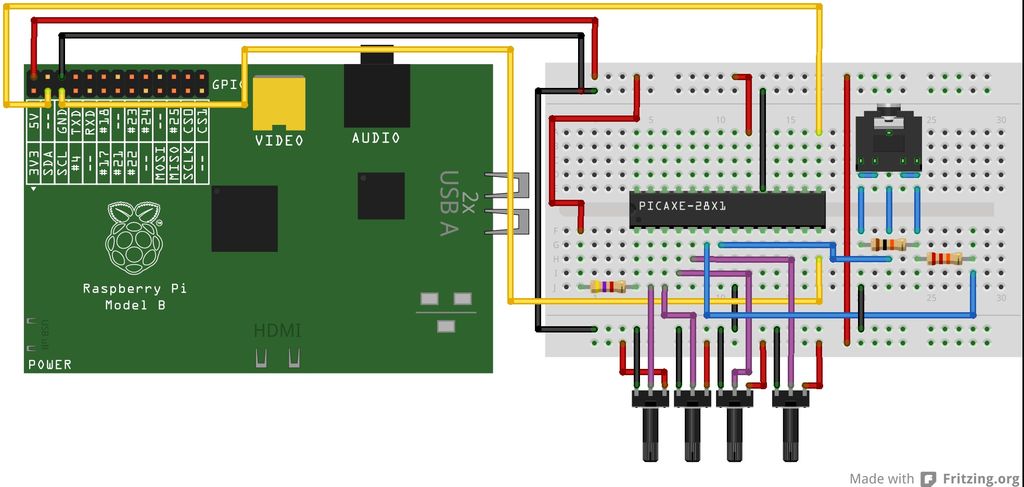
You will need to download the below code into your PICAXE. Values from ADC is dumped into the micro-controller's scratchpad memory which can be accessed via I2C bus.
#no_data
#no_table
hi2csetup i2cslave, 100000
main:
readadc 0,b1
readadc 1, b2
readadc 2, b3
readadc 3, b4
put 1, b1
put 2, b2
put 3, b3
put 4, b4
goto main
Code for Raspberry Pi:-
I have created a python script to access the PICAXE's scratchpad memory over I2C bus.It reads and displays the values.Save the script as read_adc.py.
import smbus
import time
bus=smbus.SMBus(0)
add=0x10
def read(reg):
value=bus.read_byte_data(add, reg)
return value
adc_channel1=0
adc_channel2=0
adc_channel3=0
adc_channel4=0
while True:
adc_channel1=read(1)
adc_channel2=read(2)
adc_channel3=read(3)
adc_channel4=read(4)
print adc_channel1
print adc_channel2
print adc_channel3
print adc_channel4
time.sleep(0.3)
Testing:-
Run the script on your pi as-
root@raspberrypi:~# sudo python read_adc.py
It should now display the ADC values in your screen!
Warning:- Use a voltage level shifter ( 5V <----> 3.3V ) when interfacing the PICAXE with Raspberry Pi, as Pi cannot tolerate 5V!.